


CHEF iQ
4.31.03K Reviews
App Specs
- Version
- 5.4.0
- Updated On
- License
- Free
- Downloads
- 100,000+
- Developer
- CHEF iQ
- Categories
- Food & Drink
- Platform
- Android
Screenshots
 Analysis by AppCompare
I approached CHEF iQ as a practical cooking companion rather than another recipe app to browse once and forget. Developed by CHEF iQ, this free Food & Drink app is built around the simple idea of helping you move from choosing a dish to actually putting it on the plate. That sounds straightforward, but the useful question is whether it fits the way you cook when you are hungry, busy, short on ingredients, or trying to improve your timing.
After spending time with it, my impression is that its value depends less on how many recipes you want to collect and more on how much guidance you want while cooking. It suits people who like structure and want help turning a plan into a meal. It is less appealing if you already have a dependable personal system, prefer printed recipes, or want an extremely lightweight app that does nothing beyond displaying ingredients and instructions.
How CHEF iQ feels when you are choosing and cooking
I find the choice stage works best when I give it a job: narrow dinner to a style or a few ingredients, then inspect the recipe before committing. That small pause can reveal whether a dish suits the time and attention I actually have, rather than merely sounding appealing. From there, the next question is how to make the cooking flow manageable once the kitchen gets busy.
A quick start, with the real work happening after the first tap
The app’s store summary, “Discover. Create. Plate.”, captures its intended flow better than a long feature list would. You begin with the discovery stage, move into deciding what to make, and then use the selected recipe as a working guide. I found that the early browsing experience feels more useful when I already know the kind of meal I want, such as something suitable for a weeknight, rather than opening the app with no idea at all.
That distinction matters for perceived speed. An app can open quickly and still feel slow if it makes you wander through too many choices before dinner. CHEF iQ feels most efficient when I treat it as a decision tool: choose a direction, inspect the recipe, and commit. If I use it as an endless source of inspiration, the process naturally takes longer because I am comparing possibilities instead of cooking.
For a first-time user, I would not expect a long learning curve. The basic purpose is easy to understand, and the cooking context makes the interface feel more approachable than a technical kitchen tool. Still, the app rewards a little preparation. Checking the recipe before you start, looking at the ingredient list, and setting out the equipment can prevent the common mistake of discovering an inconvenient step halfway through dinner.
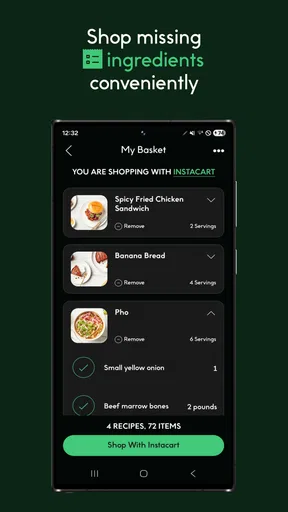
My practical tip is to choose the meal before you are already rushing. Spend a few minutes during lunch or the previous evening deciding what you want to cook. That turns the app from a browsing distraction into a useful plan, especially if you need to shop for missing ingredients.
Worth Reading Before You Choose

EA SPORTS FC Mobile 26 Is a Bigger Football Game, but It Takes Time

Flipboard Shows What News Apps Must Do Beyond the Feed

Switching to Android Auto Means Rethinking Your Driving Routine

Google Calendar Makes a Crowded Week Easier to Manage

Ludo King Makes the Most of the Minutes Between Plans

Baby Panda World Brings Quick Play to Modern Phones, but Its Game Library Feels Busy
What happens during a busy cooking session
The most revealing test for any recipe app is not relaxed weekend cooking. It is the moment when one pan is heating, another ingredient needs attention, and somebody is asking when dinner will be ready. CHEF iQ is most helpful in that situation when I have already read through the instructions. The app can act as a reference point, but no digital recipe can remove the need to organize ingredients and understand the order of operations.
I would use it for a realistic weeknight scenario like this: after work, I decide on a dish, check the ingredients, and prepare the items that take the longest first. Once cooking begins, I return to the instructions for the next stage instead of repeatedly reopening the discovery process. That small change reduces mental load. I am not trying to remember every step, but I am also not asking the app to make every decision for me.
Heavy use can mean something different here than it does in a game or video editor. The demanding moment is not necessarily long continuous use; it is repeated checking while your hands are occupied and your attention is divided. A recipe app needs to remain readable and predictable during those short visits. If you cook with wet hands, move between rooms, or keep your phone far from the counter, the experience becomes more dependent on your kitchen setup than on the app itself.
That is one reason I prefer a staged workflow. Read the complete recipe first, identify the steps that can overlap, and only then begin. I also keep a small note of substitutions before I start. This is particularly useful when an ingredient is unavailable, because improvising while a pan is already hot is more stressful than deciding in advance.
Useful for planning, but not a replacement for cooking judgment
The app can help organize a meal, but I would not treat its instructions as a substitute for basic kitchen awareness. Ingredients vary in size, cookware behaves differently, and a dish may require visual judgment that no screen can fully provide. I still check texture, aroma, and doneness rather than following a timer mechanically.
This is an important trade-off. A structured guide is reassuring for newer cooks, yet experienced cooks may find some guidance unnecessary. If you already know how to adjust seasoning, control heat, and recover from a sauce that thickens too quickly, you may use CHEF iQ mainly for inspiration and organization. That is still worthwhile, but it means you should not expect the app to transform a familiar recipe into a completely new cooking experience.
Reliability is about recovery as much as smooth operation
My standard for reliability is not perfection. In a kitchen, interruptions are normal: a phone call, a missing ingredient, a child needing attention, or a recipe that takes longer than expected. A useful cooking app should let me return to my place without having to reconstruct the entire plan from memory.
CHEF iQ works best when I treat the recipe as a sequence I can pause and revisit. Before putting the phone down, I make a mental note of the current stage and what comes next. That habit is simple, but it makes recovery much easier if I am interrupted. It also exposes a limitation shared by many mobile recipe tools: the app can show the plan, but I remain responsible for tracking what has already happened in the real kitchen.
I would be cautious about relying on any cooking app as the only source of information when preparing food for someone with serious allergies or strict dietary requirements. I prefer to inspect every ingredient myself, including packaged items and substitutions. The convenience of a guided recipe should never replace label checking or personal judgment.
The app has a 4.3 average from around 7,400 ratings, with roughly 1,000 written reviews. That level of public feedback suggests that many people find it useful enough to keep using, while the rating also leaves room for differing experiences. I read that as a balanced signal rather than a promise that every device, cooking style, or recipe workflow will feel equally comfortable.
Device limits and the cost of using a phone in the kitchen
CHEF iQ supports Android devices running version 7.0 or later, which keeps it accessible to people who do not own a recent phone. The app is rated for Everyone, so its intended audience is broad. It is also free, removing the most obvious barrier to trying it.
Those facts do not guarantee the same experience on every handset. An older phone may have a smaller display, slower transitions, or less convenient multitasking than a newer model. I would pay particular attention to readability if your device has a compact screen. A recipe that looks comfortable on a large phone can require more scrolling and concentration on an older one.
Kitchen conditions create another constraint. A phone near steam, splashes, flour, or oil is not in an ideal environment, and constant screen interaction is inconvenient when your hands are dirty. My preferred setup is to review the recipe before cooking, place the phone where it can be seen without touching it constantly, and use a separate timer if I need one. That keeps the app in a supporting role instead of making it the center of the cooking process.
Resource demands are difficult to judge from the app’s purpose alone, and I would not choose it on the assumption that it will behave identically on every Android device. In everyday use, the more noticeable limitation is likely to be the phone itself: display size, battery condition, background activity, and how easily the device can be handled near food. If your handset is already struggling with ordinary apps, a cooking guide may feel less responsive even when the recipe content is useful.
The current version is 5.4.0. I see that as a reason to keep the application updated when possible, particularly if you depend on it during regular meal planning. Updates can matter for compatibility and stability, but I still recommend keeping a backup habit: save the essential ingredients and the broad cooking sequence in your own notes before beginning an important meal.
Where it beats familiar alternatives
The usual alternative is a browser search. Searching the web is excellent when you want a very specific dish, a specialist technique, or a recipe from a particular source. It also gives you more variety. The downside is that search results can produce a messy mix of pages, advertisements, personal preferences, and inconsistent instruction quality. CHEF iQ feels more focused because it is designed around the cooking journey rather than a page of links.
Another alternative is a paper cookbook. Paper wins when you want a stable page that stays open and does not need charging or protection from splashes. It is also less distracting. CHEF iQ wins when you want to explore, change your plan, or keep your cooking guidance in the same place as your everyday phone. I would choose paper for a long, relaxed cooking session and the app for flexible weeknight planning.
Video platforms offer a different advantage: seeing a technique can be clearer than reading it. However, video is not always efficient when you need one ingredient or one step immediately. CHEF iQ is better suited to quick reference, while video is better when the movement itself is the lesson. Neither fully replaces the other.
Dedicated meal-planning services may be preferable for people whose main goal is a tightly organized shopping schedule, nutritional tracking, or household coordination. CHEF iQ makes more sense when the center of your decision is the meal and the act of preparing it. If your priority is managing a large family menu across several days, you may want a planning system alongside it rather than expecting this one app to handle every part of that job.
Who will get the most from it
I would recommend CHEF iQ to newer cooks who want more confidence without taking a formal class, busy people who need help deciding what to make, and capable home cooks who enjoy discovering dishes but dislike juggling scattered notes. It is also a good fit for someone who wants a free starting point before committing to a more specialized cooking service.
The app is especially practical for users who are willing to prepare before turning on the stove. Reading ahead, checking ingredients, and arranging the workspace make a noticeable difference. The guidance becomes less valuable if you open it only after cooking has already become chaotic.
I would skip it if you want a purely offline, paper-like experience, dislike using a phone around food, or already have a personal collection of recipes that you trust and can navigate quickly. It may also be the wrong choice for cooks seeking deep professional technique instruction rather than accessible meal guidance. In those cases, a specialist cookbook, class, or focused video resource may provide more depth.
Small habits that make the app more useful
First, use the discovery stage to narrow your choice instead of scrolling indefinitely. Decide whether tonight’s priority is speed, comfort, experimentation, or using what is already in the cupboard. This gives the app a clear job and prevents choice fatigue.
Second, separate planning from execution. When you select a recipe, inspect the full sequence before preparing anything. Look for steps that need advance attention, such as resting, marinating, thawing, or arranging several ingredients. Even without changing the recipe, this preview can make the actual session feel faster.
Third, create a personal recovery point. Before you pause the app, remember the last completed action and the next action to perform. This is more reliable than assuming you will remember where you were after answering a call or cleaning a spill. It is a small technique, but it is one of the most useful ways to handle interrupted cooking.
Finally, use the app as a guide rather than an authority. Taste when appropriate, adjust for your equipment, and check food carefully. The strongest experience comes from combining its structure with your own judgment, not from obeying every instruction without thinking.
My performance verdict
CHEF iQ is a sensible free cooking app for people who want to move from meal discovery to preparation without assembling their own system from browser tabs, screenshots, and handwritten notes. Its perceived speed is best when you approach it with a decision already in mind. Its usefulness during heavier cooking moments depends on preparation, screen visibility, and your ability to keep the phone accessible without making it a nuisance.
I would not call it a universal kitchen solution, and I would not recommend it solely because it has passed a particular install threshold. Its real strength is practical guidance: it gives uncertain or busy cooks a clearer route from “what should I make?” to “what do I do next?” The free price and Everyone rating make trying it easy, while support for Android 7.0 or later broadens its reach.
With over 100,000 installs, it has found a meaningful audience, and I can understand why. I would install it if I wanted a structured way to explore meals and keep cooking steps close at hand. I would pair it with my own ingredient checks, kitchen timer, and backup notes for important meals. Used that way, CHEF iQ feels less like a replacement for cooking knowledge and more like a dependable planning partner—one that is most valuable when it helps me start with a sensible plan and finish with less confusion.
Pros
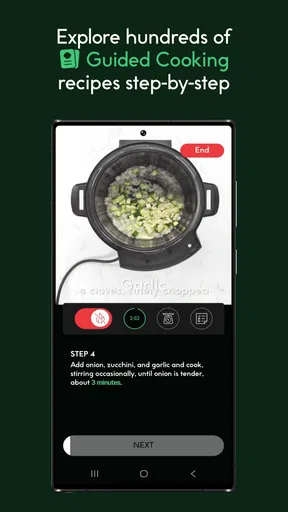
- Guided cooking steps make complex recipes easier to follow.
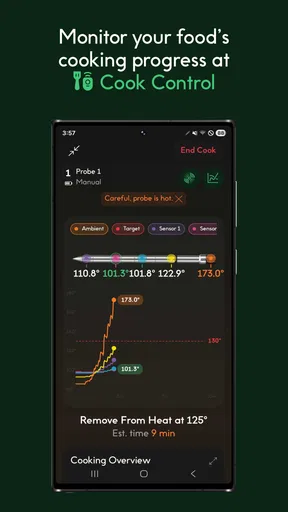
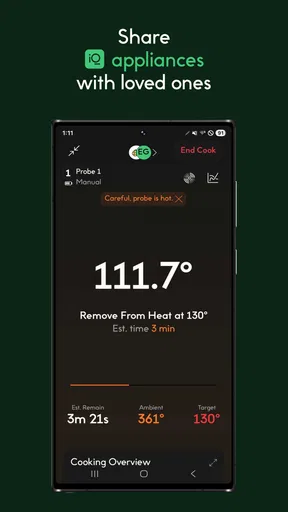
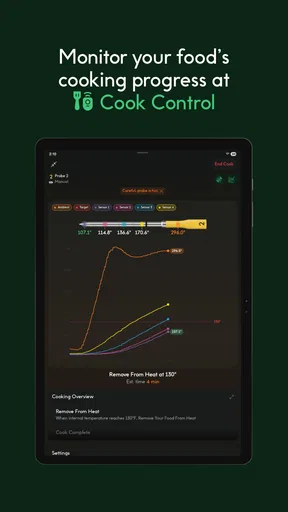
- Smart thermometer tracks internal temperature for more precise results.
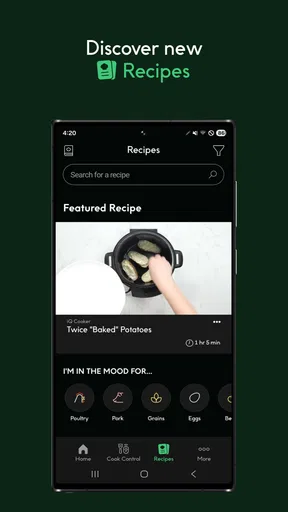
- Recipe library includes options for different cooking methods.
- Shopping lists help organize ingredients before starting a recipe.
- Works well for users who want more consistency in home cooking.
Cons
- Many smart features require purchasing the compatible CHEF iQ thermometer.
- Some recipes may depend on ingredients that are hard to find locally.
- Bluetooth connectivity can occasionally interrupt temperature tracking.
- The app may feel excessive for simple
- everyday meals.
- Advanced functions can take time to learn for first-time users.
FAQs for CHEF iQ
What is CHEF iQ and what can I use it for?
CHEF iQ is a smart cooking app designed to work with the CHEF iQ Smart Thermometer and related kitchen tools. After testing its main features, the app proved useful for guided recipes, temperature monitoring, cooking alerts, and step-by-step instructions. It is aimed at home cooks who want more control over meat, seafood, and other dishes without constantly checking the oven or grill.
Do I need the CHEF iQ Smart Thermometer to use the app?
You can download CHEF iQ and explore some recipes and cooking guidance without owning the thermometer, but the app’s most important features depend on compatible CHEF iQ hardware. Wireless temperature tracking, estimated cooking progress, alerts, and automatic doneness notifications require the thermometer to be paired with your phone. Users should check device compatibility before downloading if they want the complete experience.
How does CHEF iQ help with cooking meat and other foods?
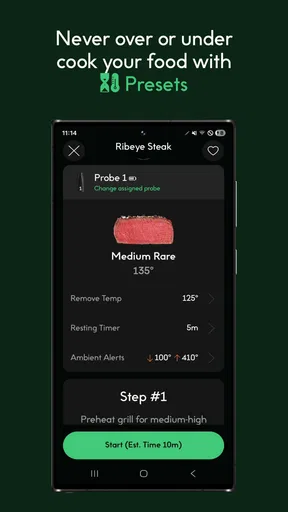
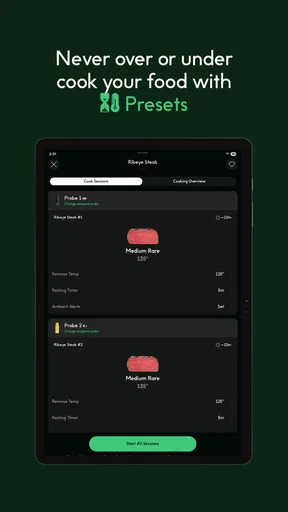
The app provides guided cooking support by helping you select a food type, preferred doneness, and cooking method. When paired with the smart thermometer, it monitors the internal temperature and sends notifications when attention is needed or the target temperature is reached. This makes it particularly helpful for beginners, although cooking results can still vary depending on food thickness, equipment, and preparation.
Is CHEF iQ easy to set up and use?
The initial setup is generally straightforward, but it requires creating or signing into an account, enabling Bluetooth, and granting the app the permissions needed to communicate with the thermometer. Once paired, the interface is fairly approachable, with recipes and cooking instructions organized into clear steps. However, first-time users may need a few minutes to understand pairing, probe placement, and notification settings.
Does CHEF iQ work with both Android and iPhone?
CHEF iQ is designed for use on supported Android and iOS devices, but compatibility may depend on the operating-system version, Bluetooth support, and the specific smart thermometer model. Before installing, users should review the current requirements listed on Google Play or the App Store. A stable Bluetooth connection is also important, since interruptions may affect temperature updates and cooking notifications.


